2 Quickstart
A minimal introduction to Plotje
Setup
Add Plotje to your deps.edn. Current release: 
For this demo, you will also need:
 - to visualize plots with Clay. Follow Clay documentation for recommended usage. You may find the videos useful. It is recommended to set Clay up using the Setup for your specific IDE or editor.
 - for the RDatasets collection
Then require the API:
(ns plotje-book.quickstart
  (:require
   ;; Rdatasets -- standard datasets
   [scicloj.metamorph.ml.rdatasets :as rdatasets]
   ;; Kindly -- notebook rendering protocol
   [scicloj.kindly.v4.kind :as kind]
   ;; Plotje -- composable plotting
   [scicloj.plotje.api :as pj]))
Use Clay or other Kindly-compatible tools to visualize the examples below.
Your First Plot
Load the classic iris dataset and scatter two columns:
(-> (rdatasets/datasets-iris)
(pj/lay-point :sepal-length :sepal-width))rdatasets/datasets-irisloads the classic iris dataset from the RDatasets collection as a Tablecloth dataset with keyword column names.pj/lay-pointshows each row as a dot (scatter plot).
Plain Data
You do not need to load a CSV – Plotje accepts plain Clojure data and coerces it into a dataset internally. A map of columns works directly:
(-> {:x [1 2 3 4 5] :y [2 4 3 5 4]}
(pj/lay-point :x :y))When the dataset has few columns, you can skip the column names – Plotje infers them from the dataset shape:
(-> {:x [1 2 3 4 5] :y [2 4 3 5 4]}
pj/lay-point)Auto-inference covers 1-3 column datasets. With 4 or more columns Plotje reports an error – pass column names like (pj/lay-point data :x :y).
See Core Concepts for more input formats.
String column names also work – keywords are conventional but not required:
(-> {"x" [1 2 3 4 5] "y" [2 4 3 5 4]}
(pj/lay-point "x" "y"))Color
Map a column to :color to color points by group.
(-> (rdatasets/datasets-iris)
(pj/lay-point :sepal-length :sepal-width {:color :species}))More Chart Types
Each pj/lay-* function adds a different chart type.
Histogram – pass a single column for automatic binning:
(-> (rdatasets/datasets-iris)
(pj/lay-histogram :sepal-length))Bar chart – count occurrences of a categorical column:
(-> (rdatasets/datasets-iris)
(pj/lay-bar :species))Horizontal bars – flip with pj/coord:
(-> (rdatasets/datasets-iris)
    (pj/lay-bar :species)
(pj/coord :flip))Line chart – connect points in order:
(-> {:x [1 2 3 4 5 6 7 8]
     :y [3 5 4 7 6 8 7 9]}
(pj/lay-line :x :y))Boxplot – compare distributions across categories:
(-> (rdatasets/datasets-iris)
(pj/lay-boxplot :species :sepal-width))See the Layer Types chapter for the full list of chart types.
Inference
pj/pose declares which columns to plot without committing to a chart type. When a pipeline ends at pj/pose (no pj/lay-*), Plotje picks the chart type from the column types. Two numerical columns produce a scatter plot:
(-> (rdatasets/datasets-iris)
(pj/pose :sepal-length :sepal-width))A single categorical column produces a bar chart:
(-> (rdatasets/datasets-iris)
(pj/pose :species))A single numerical column produces a histogram:
(-> (rdatasets/datasets-iris)
(pj/pose :sepal-length))See the Inference Rules chapter for the full set of rules.
Multiple Layers
Use pj/pose to set column mappings for a pose, then add layers with pj/lay-*. All layers on this pose inherit the pose’s mappings. Here (pj/lay-smooth {:stat :linear-model}) sets the layer’s stat (the computation applied before rendering) to a linear model, adding a regression line per group:
(-> (rdatasets/datasets-iris)
    (pj/pose :sepal-length :sepal-width {:color :species})
    pj/lay-point
(pj/lay-smooth {:stat :linear-model}))Titles and Labels
Use pj/options for width, height, title, and axis labels:
(-> (rdatasets/datasets-iris)
    (pj/lay-point :petal-length :petal-width {:color :species})
    (pj/options {:width 500 :height 350
                 :title "Iris Petals"
                 :x-label "Petal Length (cm)"
:y-label "Petal Width (cm)"}))Dashboards
Combine multiple plots with pj/arrange:
(pj/arrange [(pj/lay-point (rdatasets/datasets-iris) :sepal-length :sepal-width {:color :species})
             (pj/lay-histogram (rdatasets/datasets-iris) :sepal-length {:color :species})]
{:cols 2})Getting the SVG
The examples above auto-render in this notebook because Clay recognizes Plotje poses and visualizes them. In an interactive workflow with Clay (or another Kindly-compatible tool), you rarely need the SVG explicitly.
When you do want it – to inspect the hiccup or embed the plot in a webpage – call pj/plot:
(-> (rdatasets/datasets-iris)
    (pj/lay-point :sepal-length :sepal-width)
pj/plot)The result is a hiccup vector starting with :svg – a Clojure data representation of the SVG markup. The notebook auto-rendered it as a plot above because Clay has built-in hiccup rendering. To see the hiccup value itself rather than its rendering, wrap with kind/pprint:
(-> (rdatasets/datasets-iris)
    (pj/lay-point :sepal-length :sepal-width)
    pj/plot
kind/pprint)[:svg
{:xmlns "http://www.w3.org/2000/svg",
:width 600,
:height 400,
:viewBox "0 0 600 400",
:role "img",
:class "plotje-plot",
:font-family
"system-ui, -apple-system, BlinkMacSystemFont, 'Segoe UI', sans-serif"}
[:g
[:g
{:transform "translate(12.00,181.00)"}
[:g
{:transform "rotate(-90.00)"}
[:g
[:text
{:fill "rgb(51,51,51)",
:fill-opacity 1.0,
:font-size 13,
:dominant-baseline "hanging",
:text-anchor "middle"}
"sepal width"]]]]
[:g
{:transform "translate(321.25,382.00)"}
[:g
[:text
{:fill "rgb(51,51,51)",
:fill-opacity 1.0,
:font-size 13,
:dominant-baseline "hanging",
:text-anchor "middle"}
"sepal length"]]]
[:g
{:transform "translate(52.50,10.00)"}
[:g
[:g
[:rect
{:fill "rgb(232,232,232)",
:fill-opacity 1.0,
:stroke "none",
:x 0,
:y 0,
:width 537.5,
:height 342.0}]]]]
[:g
{:transform "translate(42.50,0.00)"}
[:g
[:g
[:g
[:g
[:polyline
{:fill "none",
:stroke "rgb(245,245,245)",
:stroke-opacity 1.0,
:stroke-width 0.6,
:points "61.58,10.00 61.58,352.00"}]]]]
[:g
[:g
[:g
[:polyline
{:fill "none",
:stroke "rgb(245,245,245)",
:stroke-opacity 1.0,
:stroke-width 0.6,
:points "129.44,10.00 129.44,352.00"}]]]]
[:g
[:g
[:g
[:polyline
{:fill "none",
:stroke "rgb(245,245,245)",
:stroke-opacity 1.0,
:stroke-width 0.6,
:points "197.31,10.00 197.31,352.00"}]]]]
[:g
[:g
[:g
[:polyline
{:fill "none",
:stroke "rgb(245,245,245)",
:stroke-opacity 1.0,
:stroke-width 0.6,
:points "265.18,10.00 265.18,352.00"}]]]]
[:g
[:g
[:g
[:polyline
{:fill "none",
:stroke "rgb(245,245,245)",
:stroke-opacity 1.0,
:stroke-width 0.6,
:points "333.04,10.00 333.04,352.00"}]]]]
[:g
[:g
[:g
[:polyline
{:fill "none",
:stroke "rgb(245,245,245)",
:stroke-opacity 1.0,
:stroke-width 0.6,
:points "400.91,10.00 400.91,352.00"}]]]]
[:g
[:g
[:g
[:polyline
{:fill "none",
:stroke "rgb(245,245,245)",
:stroke-opacity 1.0,
:stroke-width 0.6,
:points "468.78,10.00 468.78,352.00"}]]]]
[:g
[:g
[:g
[:polyline
{:fill "none",
:stroke "rgb(245,245,245)",
:stroke-opacity 1.0,
:stroke-width 0.6,
:points "536.64,10.00 536.64,352.00"}]]]]
[:g
[:g
[:g
[:polyline
{:fill "none",
:stroke "rgb(245,245,245)",
:stroke-opacity 1.0,
:stroke-width 0.6,
:points "10.00,336.45 547.50,336.45"}]]]]
[:g
[:g
[:g
[:polyline
{:fill "none",
:stroke "rgb(245,245,245)",
:stroke-opacity 1.0,
:stroke-width 0.6,
:points "10.00,271.68 547.50,271.68"}]]]]
[:g
[:g
[:g
[:polyline
{:fill "none",
:stroke "rgb(245,245,245)",
:stroke-opacity 1.0,
:stroke-width 0.6,
:points "10.00,206.91 547.50,206.91"}]]]]
[:g
[:g
[:g
[:polyline
{:fill "none",
:stroke "rgb(245,245,245)",
:stroke-opacity 1.0,
:stroke-width 0.6,
:points "10.00,142.14 547.50,142.14"}]]]]
[:g
[:g
[:g
[:polyline
{:fill "none",
:stroke "rgb(245,245,245)",
:stroke-opacity 1.0,
:stroke-width 0.6,
:points "10.00,77.36 547.50,77.36"}]]]]
[:g
[:g
[:g
[:polyline
{:fill "none",
:stroke "rgb(245,245,245)",
:stroke-opacity 1.0,
:stroke-width 0.6,
:points "10.00,12.59 547.50,12.59"}]]]]
[:g
{}
[:clipPath
{:id "plotje-clip-8qlew2"}
[:rect
{:x "10.00", :y "10.00", :width "537.50", :height "342.00"}]]
[:g
{:clip-path "url(#plotje-clip-8qlew2)"}
[:g
[:g
{:transform "translate(140.02,139.14)", :data-row-idx 0}
[:g
[:g
[:rect
{:y 0,
:rx 3.0,
:stroke "none",
:fill "rgb(51,51,51)",
:width 6.0,
:x 0,
:ry 3.0,
:fill-opacity 0.75,
:height 6.0}]]]]
[:g
{:transform "translate(112.87,203.91)", :data-row-idx 1}
[:g
[:g
[:rect
{:y 0,
:rx 3.0,
:stroke "none",
:fill "rgb(51,51,51)",
:width 6.0,
:x 0,
:ry 3.0,
:fill-opacity 0.75,
:height 6.0}]]]]
[:g
{:transform "translate(85.72,178.00)", :data-row-idx 2}
[:g
[:g
[:rect
{:y 0,
:rx 3.0,
:stroke "none",
:fill "rgb(51,51,51)",
:width 6.0,
:x 0,
:ry 3.0,
:fill-opacity 0.75,
:height 6.0}]]]]
[:g
{:transform "translate(72.15,190.95)", :data-row-idx 3}
[:g
[:g
[:rect
{:y 0,
:rx 3.0,
:stroke "none",
:fill "rgb(51,51,51)",
:width 6.0,
:x 0,
:ry 3.0,
:fill-opacity 0.75,
:height 6.0}]]]]
[:g
{:transform "translate(126.44,126.18)", :data-row-idx 4}
[:g
[:g
[:rect
{:y 0,
:rx 3.0,
:stroke "none",
:fill "rgb(51,51,51)",
:width 6.0,
:x 0,
:ry 3.0,
:fill-opacity 0.75,
:height 6.0}]]]]
[:g
{:transform "translate(180.74,87.32)", :data-row-idx 5}
[:g
[:g
[:rect
{:y 0,
:rx 3.0,
:stroke "none",
:fill "rgb(51,51,51)",
:width 6.0,
:x 0,
:ry 3.0,
:fill-opacity 0.75,
:height 6.0}]]]]
[:g
{:transform "translate(72.15,152.09)", :data-row-idx 6}
[:g
[:g
[:rect
{:y 0,
:rx 3.0,
:stroke "none",
:fill "rgb(51,51,51)",
:width 6.0,
:x 0,
:ry 3.0,
:fill-opacity 0.75,
:height 6.0}]]]]
[:g
{:transform "translate(126.44,152.09)", :data-row-idx 7}
[:g
[:g
[:rect
{:y 0,
:rx 3.0,
:stroke "none",
:fill "rgb(51,51,51)",
:width 6.0,
:x 0,
:ry 3.0,
:fill-opacity 0.75,
:height 6.0}]]]]
[:g
{:transform "translate(45.01,216.86)", :data-row-idx 8}
[:g
[:g
[:rect
{:y 0,
:rx 3.0,
:stroke "none",
:fill "rgb(51,51,51)",
:width 6.0,
:x 0,
:ry 3.0,
:fill-opacity 0.75,
:height 6.0}]]]]
[:g
{:transform "translate(112.87,190.95)", :data-row-idx 9}
[:g
[:g
[:rect
{:y 0,
:rx 3.0,
:stroke "none",
:fill "rgb(51,51,51)",
:width 6.0,
:x 0,
:ry 3.0,
:fill-opacity 0.75,
:height 6.0}]]]]
[:g
{:transform "translate(180.74,113.23)", :data-row-idx 10}
[:g
[:g
[:rect
{:y 0,
:rx 3.0,
:stroke "none",
:fill "rgb(51,51,51)",
:width 6.0,
:x 0,
:ry 3.0,
:fill-opacity 0.75,
:height 6.0}]]]]
[:g
{:transform "translate(99.30,152.09)", :data-row-idx 11}
[:g
[:g
[:rect
{:y 0,
:rx 3.0,
:stroke "none",
:fill "rgb(51,51,51)",
:width 6.0,
:x 0,
:ry 3.0,
:fill-opacity 0.75,
:height 6.0}]]]]
[:g
{:transform "translate(99.30,203.91)", :data-row-idx 12}
[:g
[:g
[:rect
{:y 0,
:rx 3.0,
:stroke "none",
:fill "rgb(51,51,51)",
:width 6.0,
:x 0,
:ry 3.0,
:fill-opacity 0.75,
:height 6.0}]]]]
[:g
{:transform "translate(31.43,203.91)", :data-row-idx 13}
[:g
[:g
[:rect
{:y 0,
:rx 3.0,
:stroke "none",
:fill "rgb(51,51,51)",
:width 6.0,
:x 0,
:ry 3.0,
:fill-opacity 0.75,
:height 6.0}]]]]
[:g
{:transform "translate(235.03,74.36)", :data-row-idx 14}
[:g
[:g
[:rect
{:y 0,
:rx 3.0,
:stroke "none",
:fill "rgb(51,51,51)",
:width 6.0,
:x 0,
:ry 3.0,
:fill-opacity 0.75,
:height 6.0}]]]]
[:g
{:transform "translate(221.46,22.55)", :data-row-idx 15}
[:g
[:g
[:rect
{:y 0,
:rx 3.0,
:stroke "none",
:fill "rgb(51,51,51)",
:width 6.0,
:x 0,
:ry 3.0,
:fill-opacity 0.75,
:height 6.0}]]]]
[:g
{:transform "translate(180.74,87.32)", :data-row-idx 16}
[:g
[:g
[:rect
{:y 0,
:rx 3.0,
:stroke "none",
:fill "rgb(51,51,51)",
:width 6.0,
:x 0,
:ry 3.0,
:fill-opacity 0.75,
:height 6.0}]]]]
[:g
{:transform "translate(140.02,139.14)", :data-row-idx 17}
[:g
[:g
[:rect
{:y 0,
:rx 3.0,
:stroke "none",
:fill "rgb(51,51,51)",
:width 6.0,
:x 0,
:ry 3.0,
:fill-opacity 0.75,
:height 6.0}]]]]
[:g
{:transform "translate(221.46,100.27)", :data-row-idx 18}
[:g
[:g
[:rect
{:y 0,
:rx 3.0,
:stroke "none",
:fill "rgb(51,51,51)",
:width 6.0,
:x 0,
:ry 3.0,
:fill-opacity 0.75,
:height 6.0}]]]]
[:g
{:transform "translate(140.02,100.27)", :data-row-idx 19}
[:g
[:g
[:rect
{:y 0,
:rx 3.0,
:stroke "none",
:fill "rgb(51,51,51)",
:width 6.0,
:x 0,
:ry 3.0,
:fill-opacity 0.75,
:height 6.0}]]]]
[:g
{:transform "translate(180.74,152.09)", :data-row-idx 20}
[:g
[:g
[:rect
{:y 0,
:rx 3.0,
:stroke "none",
:fill "rgb(51,51,51)",
:width 6.0,
:x 0,
:ry 3.0,
:fill-opacity 0.75,
:height 6.0}]]]]
[:g
{:transform "translate(140.02,113.23)", :data-row-idx 21}
[:g
[:g
[:rect
{:y 0,
:rx 3.0,
:stroke "none",
:fill "rgb(51,51,51)",
:width 6.0,
:x 0,
:ry 3.0,
:fill-opacity 0.75,
:height 6.0}]]]]
[:g
{:transform "translate(72.15,126.18)", :data-row-idx 22}
[:g
[:g
[:rect
{:y 0,
:rx 3.0,
:stroke "none",
:fill "rgb(51,51,51)",
:width 6.0,
:x 0,
:ry 3.0,
:fill-opacity 0.75,
:height 6.0}]]]]
[:g
{:transform "translate(140.02,165.05)", :data-row-idx 23}
[:g
[:g
[:rect
{:y 0,
:rx 3.0,
:stroke "none",
:fill "rgb(51,51,51)",
:width 6.0,
:x 0,
:ry 3.0,
:fill-opacity 0.75,
:height 6.0}]]]]
[:g
{:transform "translate(99.30,152.09)", :data-row-idx 24}
[:g
[:g
[:rect
{:y 0,
:rx 3.0,
:stroke "none",
:fill "rgb(51,51,51)",
:width 6.0,
:x 0,
:ry 3.0,
:fill-opacity 0.75,
:height 6.0}]]]]
[:g
{:transform "translate(126.44,203.91)", :data-row-idx 25}
[:g
[:g
[:rect
{:y 0,
:rx 3.0,
:stroke "none",
:fill "rgb(51,51,51)",
:width 6.0,
:x 0,
:ry 3.0,
:fill-opacity 0.75,
:height 6.0}]]]]
[:g
{:transform "translate(126.44,152.09)", :data-row-idx 26}
[:g
[:g
[:rect
{:y 0,
:rx 3.0,
:stroke "none",
:fill "rgb(51,51,51)",
:width 6.0,
:x 0,
:ry 3.0,
:fill-opacity 0.75,
:height 6.0}]]]]
[:g
{:transform "translate(153.59,139.14)", :data-row-idx 27}
[:g
[:g
[:rect
{:y 0,
:rx 3.0,
:stroke "none",
:fill "rgb(51,51,51)",
:width 6.0,
:x 0,
:ry 3.0,
:fill-opacity 0.75,
:height 6.0}]]]]
[:g
{:transform "translate(153.59,152.09)", :data-row-idx 28}
[:g
[:g
[:rect
{:y 0,
:rx 3.0,
:stroke "none",
:fill "rgb(51,51,51)",
:width 6.0,
:x 0,
:ry 3.0,
:fill-opacity 0.75,
:height 6.0}]]]]
[:g
{:transform "translate(85.72,178.00)", :data-row-idx 29}
[:g
[:g
[:rect
{:y 0,
:rx 3.0,
:stroke "none",
:fill "rgb(51,51,51)",
:width 6.0,
:x 0,
:ry 3.0,
:fill-opacity 0.75,
:height 6.0}]]]]
[:g
{:transform "translate(99.30,190.95)", :data-row-idx 30}
[:g
[:g
[:rect
{:y 0,
:rx 3.0,
:stroke "none",
:fill "rgb(51,51,51)",
:width 6.0,
:x 0,
:ry 3.0,
:fill-opacity 0.75,
:height 6.0}]]]]
[:g
{:transform "translate(180.74,152.09)", :data-row-idx 31}
[:g
[:g
[:rect
{:y 0,
:rx 3.0,
:stroke "none",
:fill "rgb(51,51,51)",
:width 6.0,
:x 0,
:ry 3.0,
:fill-opacity 0.75,
:height 6.0}]]]]
[:g
{:transform "translate(153.59,61.41)", :data-row-idx 32}
[:g
[:g
[:rect
{:y 0,
:rx 3.0,
:stroke "none",
:fill "rgb(51,51,51)",
:width 6.0,
:x 0,
:ry 3.0,
:fill-opacity 0.75,
:height 6.0}]]]]
[:g
{:transform "translate(194.31,48.45)", :data-row-idx 33}
[:g
[:g
[:rect
{:y 0,
:rx 3.0,
:stroke "none",
:fill "rgb(51,51,51)",
:width 6.0,
:x 0,
:ry 3.0,
:fill-opacity 0.75,
:height 6.0}]]]]
[:g
{:transform "translate(112.87,190.95)", :data-row-idx 34}
[:g
[:g
[:rect
{:y 0,
:rx 3.0,
:stroke "none",
:fill "rgb(51,51,51)",
:width 6.0,
:x 0,
:ry 3.0,
:fill-opacity 0.75,
:height 6.0}]]]]
[:g
{:transform "translate(126.44,178.00)", :data-row-idx 35}
[:g
[:g
[:rect
{:y 0,
:rx 3.0,
:stroke "none",
:fill "rgb(51,51,51)",
:width 6.0,
:x 0,
:ry 3.0,
:fill-opacity 0.75,
:height 6.0}]]]]
[:g
{:transform "translate(194.31,139.14)", :data-row-idx 36}
[:g
[:g
[:rect
{:y 0,
:rx 3.0,
:stroke "none",
:fill "rgb(51,51,51)",
:width 6.0,
:x 0,
:ry 3.0,
:fill-opacity 0.75,
:height 6.0}]]]]
[:g
{:transform "translate(112.87,126.18)", :data-row-idx 37}
[:g
[:g
[:rect
{:y 0,
:rx 3.0,
:stroke "none",
:fill "rgb(51,51,51)",
:width 6.0,
:x 0,
:ry 3.0,
:fill-opacity 0.75,
:height 6.0}]]]]
[:g
{:transform "translate(45.01,203.91)", :data-row-idx 38}
[:g
[:g
[:rect
{:y 0,
:rx 3.0,
:stroke "none",
:fill "rgb(51,51,51)",
:width 6.0,
:x 0,
:ry 3.0,
:fill-opacity 0.75,
:height 6.0}]]]]
[:g
{:transform "translate(140.02,152.09)", :data-row-idx 39}
[:g
[:g
[:rect
{:y 0,
:rx 3.0,
:stroke "none",
:fill "rgb(51,51,51)",
:width 6.0,
:x 0,
:ry 3.0,
:fill-opacity 0.75,
:height 6.0}]]]]
[:g
{:transform "translate(126.44,139.14)", :data-row-idx 40}
[:g
[:g
[:rect
{:y 0,
:rx 3.0,
:stroke "none",
:fill "rgb(51,51,51)",
:width 6.0,
:x 0,
:ry 3.0,
:fill-opacity 0.75,
:height 6.0}]]]]
[:g
{:transform "translate(58.58,294.59)", :data-row-idx 41}
[:g
[:g
[:rect
{:y 0,
:rx 3.0,
:stroke "none",
:fill "rgb(51,51,51)",
:width 6.0,
:x 0,
:ry 3.0,
:fill-opacity 0.75,
:height 6.0}]]]]
[:g
{:transform "translate(45.01,178.00)", :data-row-idx 42}
[:g
[:g
[:rect
{:y 0,
:rx 3.0,
:stroke "none",
:fill "rgb(51,51,51)",
:width 6.0,
:x 0,
:ry 3.0,
:fill-opacity 0.75,
:height 6.0}]]]]
[:g
{:transform "translate(126.44,139.14)", :data-row-idx 43}
[:g
[:g
[:rect
{:y 0,
:rx 3.0,
:stroke "none",
:fill "rgb(51,51,51)",
:width 6.0,
:x 0,
:ry 3.0,
:fill-opacity 0.75,
:height 6.0}]]]]
[:g
{:transform "translate(140.02,100.27)", :data-row-idx 44}
[:g
[:g
[:rect
{:y 0,
:rx 3.0,
:stroke "none",
:fill "rgb(51,51,51)",
:width 6.0,
:x 0,
:ry 3.0,
:fill-opacity 0.75,
:height 6.0}]]]]
[:g
{:transform "translate(99.30,203.91)", :data-row-idx 45}
[:g
[:g
[:rect
{:y 0,
:rx 3.0,
:stroke "none",
:fill "rgb(51,51,51)",
:width 6.0,
:x 0,
:ry 3.0,
:fill-opacity 0.75,
:height 6.0}]]]]
[:g
{:transform "translate(140.02,100.27)", :data-row-idx 46}
[:g
[:g
[:rect
{:y 0,
:rx 3.0,
:stroke "none",
:fill "rgb(51,51,51)",
:width 6.0,
:x 0,
:ry 3.0,
:fill-opacity 0.75,
:height 6.0}]]]]
[:g
{:transform "translate(72.15,178.00)", :data-row-idx 47}
[:g
[:g
[:rect
{:y 0,
:rx 3.0,
:stroke "none",
:fill "rgb(51,51,51)",
:width 6.0,
:x 0,
:ry 3.0,
:fill-opacity 0.75,
:height 6.0}]]]]
[:g
{:transform "translate(167.16,113.23)", :data-row-idx 48}
[:g
[:g
[:rect
{:y 0,
:rx 3.0,
:stroke "none",
:fill "rgb(51,51,51)",
:width 6.0,
:x 0,
:ry 3.0,
:fill-opacity 0.75,
:height 6.0}]]]]
[:g
{:transform "translate(126.44,165.05)", :data-row-idx 49}
[:g
[:g
[:rect
{:y 0,
:rx 3.0,
:stroke "none",
:fill "rgb(51,51,51)",
:width 6.0,
:x 0,
:ry 3.0,
:fill-opacity 0.75,
:height 6.0}]]]]
[:g
{:transform "translate(397.91,178.00)", :data-row-idx 50}
[:g
[:g
[:rect
{:y 0,
:rx 3.0,
:stroke "none",
:fill "rgb(51,51,51)",
:width 6.0,
:x 0,
:ry 3.0,
:fill-opacity 0.75,
:height 6.0}]]]]
[:g
{:transform "translate(316.47,178.00)", :data-row-idx 51}
[:g
[:g
[:rect
{:y 0,
:rx 3.0,
:stroke "none",
:fill "rgb(51,51,51)",
:width 6.0,
:x 0,
:ry 3.0,
:fill-opacity 0.75,
:height 6.0}]]]]
[:g
{:transform "translate(384.34,190.95)", :data-row-idx 52}
[:g
[:g
[:rect
{:y 0,
:rx 3.0,
:stroke "none",
:fill "rgb(51,51,51)",
:width 6.0,
:x 0,
:ry 3.0,
:fill-opacity 0.75,
:height 6.0}]]]]
[:g
{:transform "translate(194.31,294.59)", :data-row-idx 53}
[:g
[:g
[:rect
{:y 0,
:rx 3.0,
:stroke "none",
:fill "rgb(51,51,51)",
:width 6.0,
:x 0,
:ry 3.0,
:fill-opacity 0.75,
:height 6.0}]]]]
[:g
{:transform "translate(330.04,229.82)", :data-row-idx 54}
[:g
[:g
[:rect
{:y 0,
:rx 3.0,
:stroke "none",
:fill "rgb(51,51,51)",
:width 6.0,
:x 0,
:ry 3.0,
:fill-opacity 0.75,
:height 6.0}]]]]
[:g
{:transform "translate(221.46,229.82)", :data-row-idx 55}
[:g
[:g
[:rect
{:y 0,
:rx 3.0,
:stroke "none",
:fill "rgb(51,51,51)",
:width 6.0,
:x 0,
:ry 3.0,
:fill-opacity 0.75,
:height 6.0}]]]]
[:g
{:transform "translate(302.90,165.05)", :data-row-idx 56}
[:g
[:g
[:rect
{:y 0,
:rx 3.0,
:stroke "none",
:fill "rgb(51,51,51)",
:width 6.0,
:x 0,
:ry 3.0,
:fill-opacity 0.75,
:height 6.0}]]]]
[:g
{:transform "translate(112.87,281.64)", :data-row-idx 57}
[:g
[:g
[:rect
{:y 0,
:rx 3.0,
:stroke "none",
:fill "rgb(51,51,51)",
:width 6.0,
:x 0,
:ry 3.0,
:fill-opacity 0.75,
:height 6.0}]]]]
[:g
{:transform "translate(343.62,216.86)", :data-row-idx 58}
[:g
[:g
[:rect
{:y 0,
:rx 3.0,
:stroke "none",
:fill "rgb(51,51,51)",
:width 6.0,
:x 0,
:ry 3.0,
:fill-opacity 0.75,
:height 6.0}]]]]
[:g
{:transform "translate(153.59,242.77)", :data-row-idx 59}
[:g
[:g
[:rect
{:y 0,
:rx 3.0,
:stroke "none",
:fill "rgb(51,51,51)",
:width 6.0,
:x 0,
:ry 3.0,
:fill-opacity 0.75,
:height 6.0}]]]]
[:g
{:transform "translate(126.44,333.45)", :data-row-idx 60}
[:g
[:g
[:rect
{:y 0,
:rx 3.0,
:stroke "none",
:fill "rgb(51,51,51)",
:width 6.0,
:x 0,
:ry 3.0,
:fill-opacity 0.75,
:height 6.0}]]]]
[:g
{:transform "translate(248.60,203.91)", :data-row-idx 61}
[:g
[:g
[:rect
{:y 0,
:rx 3.0,
:stroke "none",
:fill "rgb(51,51,51)",
:width 6.0,
:x 0,
:ry 3.0,
:fill-opacity 0.75,
:height 6.0}]]]]
[:g
{:transform "translate(262.18,307.55)", :data-row-idx 62}
[:g
[:g
[:rect
{:y 0,
:rx 3.0,
:stroke "none",
:fill "rgb(51,51,51)",
:width 6.0,
:x 0,
:ry 3.0,
:fill-opacity 0.75,
:height 6.0}]]]]
[:g
{:transform "translate(275.75,216.86)", :data-row-idx 63}
[:g
[:g
[:rect
{:y 0,
:rx 3.0,
:stroke "none",
:fill "rgb(51,51,51)",
:width 6.0,
:x 0,
:ry 3.0,
:fill-opacity 0.75,
:height 6.0}]]]]
[:g
{:transform "translate(207.88,216.86)", :data-row-idx 64}
[:g
[:g
[:rect
{:y 0,
:rx 3.0,
:stroke "none",
:fill "rgb(51,51,51)",
:width 6.0,
:x 0,
:ry 3.0,
:fill-opacity 0.75,
:height 6.0}]]]]
[:g
{:transform "translate(357.19,190.95)", :data-row-idx 65}
[:g
[:g
[:rect
{:y 0,
:rx 3.0,
:stroke "none",
:fill "rgb(51,51,51)",
:width 6.0,
:x 0,
:ry 3.0,
:fill-opacity 0.75,
:height 6.0}]]]]
[:g
{:transform "translate(207.88,203.91)", :data-row-idx 66}
[:g
[:g
[:rect
{:y 0,
:rx 3.0,
:stroke "none",
:fill "rgb(51,51,51)",
:width 6.0,
:x 0,
:ry 3.0,
:fill-opacity 0.75,
:height 6.0}]]]]
[:g
{:transform "translate(235.03,242.77)", :data-row-idx 67}
[:g
[:g
[:rect
{:y 0,
:rx 3.0,
:stroke "none",
:fill "rgb(51,51,51)",
:width 6.0,
:x 0,
:ry 3.0,
:fill-opacity 0.75,
:height 6.0}]]]]
[:g
{:transform "translate(289.32,307.55)", :data-row-idx 68}
[:g
[:g
[:rect
{:y 0,
:rx 3.0,
:stroke "none",
:fill "rgb(51,51,51)",
:width 6.0,
:x 0,
:ry 3.0,
:fill-opacity 0.75,
:height 6.0}]]]]
[:g
{:transform "translate(207.88,268.68)", :data-row-idx 69}
[:g
[:g
[:rect
{:y 0,
:rx 3.0,
:stroke "none",
:fill "rgb(51,51,51)",
:width 6.0,
:x 0,
:ry 3.0,
:fill-opacity 0.75,
:height 6.0}]]]]
[:g
{:transform "translate(248.60,178.00)", :data-row-idx 70}
[:g
[:g
[:rect
{:y 0,
:rx 3.0,
:stroke "none",
:fill "rgb(51,51,51)",
:width 6.0,
:x 0,
:ry 3.0,
:fill-opacity 0.75,
:height 6.0}]]]]
[:g
{:transform "translate(275.75,229.82)", :data-row-idx 71}
[:g
[:g
[:rect
{:y 0,
:rx 3.0,
:stroke "none",
:fill "rgb(51,51,51)",
:width 6.0,
:x 0,
:ry 3.0,
:fill-opacity 0.75,
:height 6.0}]]]]
[:g
{:transform "translate(302.90,268.68)", :data-row-idx 72}
[:g
[:g
[:rect
{:y 0,
:rx 3.0,
:stroke "none",
:fill "rgb(51,51,51)",
:width 6.0,
:x 0,
:ry 3.0,
:fill-opacity 0.75,
:height 6.0}]]]]
[:g
{:transform "translate(275.75,229.82)", :data-row-idx 73}
[:g
[:g
[:rect
{:y 0,
:rx 3.0,
:stroke "none",
:fill "rgb(51,51,51)",
:width 6.0,
:x 0,
:ry 3.0,
:fill-opacity 0.75,
:height 6.0}]]]]
[:g
{:transform "translate(316.47,216.86)", :data-row-idx 74}
[:g
[:g
[:rect
{:y 0,
:rx 3.0,
:stroke "none",
:fill "rgb(51,51,51)",
:width 6.0,
:x 0,
:ry 3.0,
:fill-opacity 0.75,
:height 6.0}]]]]
[:g
{:transform "translate(343.62,203.91)", :data-row-idx 75}
[:g
[:g
[:rect
{:y 0,
:rx 3.0,
:stroke "none",
:fill "rgb(51,51,51)",
:width 6.0,
:x 0,
:ry 3.0,
:fill-opacity 0.75,
:height 6.0}]]]]
[:g
{:transform "translate(370.76,229.82)", :data-row-idx 76}
[:g
[:g
[:rect
{:y 0,
:rx 3.0,
:stroke "none",
:fill "rgb(51,51,51)",
:width 6.0,
:x 0,
:ry 3.0,
:fill-opacity 0.75,
:height 6.0}]]]]
[:g
{:transform "translate(357.19,203.91)", :data-row-idx 77}
[:g
[:g
[:rect
{:y 0,
:rx 3.0,
:stroke "none",
:fill "rgb(51,51,51)",
:width 6.0,
:x 0,
:ry 3.0,
:fill-opacity 0.75,
:height 6.0}]]]]
[:g
{:transform "translate(262.18,216.86)", :data-row-idx 78}
[:g
[:g
[:rect
{:y 0,
:rx 3.0,
:stroke "none",
:fill "rgb(51,51,51)",
:width 6.0,
:x 0,
:ry 3.0,
:fill-opacity 0.75,
:height 6.0}]]]]
[:g
{:transform "translate(221.46,255.73)", :data-row-idx 79}
[:g
[:g
[:rect
{:y 0,
:rx 3.0,
:stroke "none",
:fill "rgb(51,51,51)",
:width 6.0,
:x 0,
:ry 3.0,
:fill-opacity 0.75,
:height 6.0}]]]]
[:g
{:transform "translate(194.31,281.64)", :data-row-idx 80}
[:g
[:g
[:rect
{:y 0,
:rx 3.0,
:stroke "none",
:fill "rgb(51,51,51)",
:width 6.0,
:x 0,
:ry 3.0,
:fill-opacity 0.75,
:height 6.0}]]]]
[:g
{:transform "translate(194.31,281.64)", :data-row-idx 81}
[:g
[:g
[:rect
{:y 0,
:rx 3.0,
:stroke "none",
:fill "rgb(51,51,51)",
:width 6.0,
:x 0,
:ry 3.0,
:fill-opacity 0.75,
:height 6.0}]]]]
[:g
{:transform "translate(235.03,242.77)", :data-row-idx 82}
[:g
[:g
[:rect
{:y 0,
:rx 3.0,
:stroke "none",
:fill "rgb(51,51,51)",
:width 6.0,
:x 0,
:ry 3.0,
:fill-opacity 0.75,
:height 6.0}]]]]
[:g
{:transform "translate(262.18,242.77)", :data-row-idx 83}
[:g
[:g
[:rect
{:y 0,
:rx 3.0,
:stroke "none",
:fill "rgb(51,51,51)",
:width 6.0,
:x 0,
:ry 3.0,
:fill-opacity 0.75,
:height 6.0}]]]]
[:g
{:transform "translate(180.74,203.91)", :data-row-idx 84}
[:g
[:g
[:rect
{:y 0,
:rx 3.0,
:stroke "none",
:fill "rgb(51,51,51)",
:width 6.0,
:x 0,
:ry 3.0,
:fill-opacity 0.75,
:height 6.0}]]]]
[:g
{:transform "translate(262.18,152.09)", :data-row-idx 85}
[:g
[:g
[:rect
{:y 0,
:rx 3.0,
:stroke "none",
:fill "rgb(51,51,51)",
:width 6.0,
:x 0,
:ry 3.0,
:fill-opacity 0.75,
:height 6.0}]]]]
[:g
{:transform "translate(357.19,190.95)", :data-row-idx 86}
[:g
[:g
[:rect
{:y 0,
:rx 3.0,
:stroke "none",
:fill "rgb(51,51,51)",
:width 6.0,
:x 0,
:ry 3.0,
:fill-opacity 0.75,
:height 6.0}]]]]
[:g
{:transform "translate(302.90,294.59)", :data-row-idx 87}
[:g
[:g
[:rect
{:y 0,
:rx 3.0,
:stroke "none",
:fill "rgb(51,51,51)",
:width 6.0,
:x 0,
:ry 3.0,
:fill-opacity 0.75,
:height 6.0}]]]]
[:g
{:transform "translate(207.88,203.91)", :data-row-idx 88}
[:g
[:g
[:rect
{:y 0,
:rx 3.0,
:stroke "none",
:fill "rgb(51,51,51)",
:width 6.0,
:x 0,
:ry 3.0,
:fill-opacity 0.75,
:height 6.0}]]]]
[:g
{:transform "translate(194.31,268.68)", :data-row-idx 89}
[:g
[:g
[:rect
{:y 0,
:rx 3.0,
:stroke "none",
:fill "rgb(51,51,51)",
:width 6.0,
:x 0,
:ry 3.0,
:fill-opacity 0.75,
:height 6.0}]]]]
[:g
{:transform "translate(194.31,255.73)", :data-row-idx 90}
[:g
[:g
[:rect
{:y 0,
:rx 3.0,
:stroke "none",
:fill "rgb(51,51,51)",
:width 6.0,
:x 0,
:ry 3.0,
:fill-opacity 0.75,
:height 6.0}]]]]
[:g
{:transform "translate(275.75,203.91)", :data-row-idx 91}
[:g
[:g
[:rect
{:y 0,
:rx 3.0,
:stroke "none",
:fill "rgb(51,51,51)",
:width 6.0,
:x 0,
:ry 3.0,
:fill-opacity 0.75,
:height 6.0}]]]]
[:g
{:transform "translate(235.03,255.73)", :data-row-idx 92}
[:g
[:g
[:rect
{:y 0,
:rx 3.0,
:stroke "none",
:fill "rgb(51,51,51)",
:width 6.0,
:x 0,
:ry 3.0,
:fill-opacity 0.75,
:height 6.0}]]]]
[:g
{:transform "translate(126.44,294.59)", :data-row-idx 93}
[:g
[:g
[:rect
{:y 0,
:rx 3.0,
:stroke "none",
:fill "rgb(51,51,51)",
:width 6.0,
:x 0,
:ry 3.0,
:fill-opacity 0.75,
:height 6.0}]]]]
[:g
{:transform "translate(207.88,242.77)", :data-row-idx 94}
[:g
[:g
[:rect
{:y 0,
:rx 3.0,
:stroke "none",
:fill "rgb(51,51,51)",
:width 6.0,
:x 0,
:ry 3.0,
:fill-opacity 0.75,
:height 6.0}]]]]
[:g
{:transform "translate(221.46,203.91)", :data-row-idx 95}
[:g
[:g
[:rect
{:y 0,
:rx 3.0,
:stroke "none",
:fill "rgb(51,51,51)",
:width 6.0,
:x 0,
:ry 3.0,
:fill-opacity 0.75,
:height 6.0}]]]]
[:g
{:transform "translate(221.46,216.86)", :data-row-idx 96}
[:g
[:g
[:rect
{:y 0,
:rx 3.0,
:stroke "none",
:fill "rgb(51,51,51)",
:width 6.0,
:x 0,
:ry 3.0,
:fill-opacity 0.75,
:height 6.0}]]]]
[:g
{:transform "translate(289.32,216.86)", :data-row-idx 97}
[:g
[:g
[:rect
{:y 0,
:rx 3.0,
:stroke "none",
:fill "rgb(51,51,51)",
:width 6.0,
:x 0,
:ry 3.0,
:fill-opacity 0.75,
:height 6.0}]]]]
[:g
{:transform "translate(140.02,268.68)", :data-row-idx 98}
[:g
[:g
[:rect
{:y 0,
:rx 3.0,
:stroke "none",
:fill "rgb(51,51,51)",
:width 6.0,
:x 0,
:ry 3.0,
:fill-opacity 0.75,
:height 6.0}]]]]
[:g
{:transform "translate(221.46,229.82)", :data-row-idx 99}
[:g
[:g
[:rect
{:y 0,
:rx 3.0,
:stroke "none",
:fill "rgb(51,51,51)",
:width 6.0,
:x 0,
:ry 3.0,
:fill-opacity 0.75,
:height 6.0}]]]]
[:g
{:transform "translate(302.90,165.05)", :data-row-idx 100}
[:g
[:g
[:rect
{:y 0,
:rx 3.0,
:stroke "none",
:fill "rgb(51,51,51)",
:width 6.0,
:x 0,
:ry 3.0,
:fill-opacity 0.75,
:height 6.0}]]]]
[:g
{:transform "translate(235.03,242.77)", :data-row-idx 101}
[:g
[:g
[:rect
{:y 0,
:rx 3.0,
:stroke "none",
:fill "rgb(51,51,51)",
:width 6.0,
:x 0,
:ry 3.0,
:fill-opacity 0.75,
:height 6.0}]]]]
[:g
{:transform "translate(411.48,203.91)", :data-row-idx 102}
[:g
[:g
[:rect
{:y 0,
:rx 3.0,
:stroke "none",
:fill "rgb(51,51,51)",
:width 6.0,
:x 0,
:ry 3.0,
:fill-opacity 0.75,
:height 6.0}]]]]
[:g
{:transform "translate(302.90,216.86)", :data-row-idx 103}
[:g
[:g
[:rect
{:y 0,
:rx 3.0,
:stroke "none",
:fill "rgb(51,51,51)",
:width 6.0,
:x 0,
:ry 3.0,
:fill-opacity 0.75,
:height 6.0}]]]]
[:g
{:transform "translate(330.04,203.91)", :data-row-idx 104}
[:g
[:g
[:rect
{:y 0,
:rx 3.0,
:stroke "none",
:fill "rgb(51,51,51)",
:width 6.0,
:x 0,
:ry 3.0,
:fill-opacity 0.75,
:height 6.0}]]]]
[:g
{:transform "translate(479.35,203.91)", :data-row-idx 105}
[:g
[:g
[:rect
{:y 0,
:rx 3.0,
:stroke "none",
:fill "rgb(51,51,51)",
:width 6.0,
:x 0,
:ry 3.0,
:fill-opacity 0.75,
:height 6.0}]]]]
[:g
{:transform "translate(112.87,268.68)", :data-row-idx 106}
[:g
[:g
[:rect
{:y 0,
:rx 3.0,
:stroke "none",
:fill "rgb(51,51,51)",
:width 6.0,
:x 0,
:ry 3.0,
:fill-opacity 0.75,
:height 6.0}]]]]
[:g
{:transform "translate(438.63,216.86)", :data-row-idx 107}
[:g
[:g
[:rect
{:y 0,
:rx 3.0,
:stroke "none",
:fill "rgb(51,51,51)",
:width 6.0,
:x 0,
:ry 3.0,
:fill-opacity 0.75,
:height 6.0}]]]]
[:g
{:transform "translate(357.19,268.68)", :data-row-idx 108}
[:g
[:g
[:rect
{:y 0,
:rx 3.0,
:stroke "none",
:fill "rgb(51,51,51)",
:width 6.0,
:x 0,
:ry 3.0,
:fill-opacity 0.75,
:height 6.0}]]]]
[:g
{:transform "translate(425.06,126.18)", :data-row-idx 109}
[:g
[:g
[:rect
{:y 0,
:rx 3.0,
:stroke "none",
:fill "rgb(51,51,51)",
:width 6.0,
:x 0,
:ry 3.0,
:fill-opacity 0.75,
:height 6.0}]]]]
[:g
{:transform "translate(330.04,178.00)", :data-row-idx 110}
[:g
[:g
[:rect
{:y 0,
:rx 3.0,
:stroke "none",
:fill "rgb(51,51,51)",
:width 6.0,
:x 0,
:ry 3.0,
:fill-opacity 0.75,
:height 6.0}]]]]
[:g
{:transform "translate(316.47,242.77)", :data-row-idx 111}
[:g
[:g
[:rect
{:y 0,
:rx 3.0,
:stroke "none",
:fill "rgb(51,51,51)",
:width 6.0,
:x 0,
:ry 3.0,
:fill-opacity 0.75,
:height 6.0}]]]]
[:g
{:transform "translate(370.76,203.91)", :data-row-idx 112}
[:g
[:g
[:rect
{:y 0,
:rx 3.0,
:stroke "none",
:fill "rgb(51,51,51)",
:width 6.0,
:x 0,
:ry 3.0,
:fill-opacity 0.75,
:height 6.0}]]]]
[:g
{:transform "translate(221.46,268.68)", :data-row-idx 113}
[:g
[:g
[:rect
{:y 0,
:rx 3.0,
:stroke "none",
:fill "rgb(51,51,51)",
:width 6.0,
:x 0,
:ry 3.0,
:fill-opacity 0.75,
:height 6.0}]]]]
[:g
{:transform "translate(235.03,229.82)", :data-row-idx 114}
[:g
[:g
[:rect
{:y 0,
:rx 3.0,
:stroke "none",
:fill "rgb(51,51,51)",
:width 6.0,
:x 0,
:ry 3.0,
:fill-opacity 0.75,
:height 6.0}]]]]
[:g
{:transform "translate(316.47,178.00)", :data-row-idx 115}
[:g
[:g
[:rect
{:y 0,
:rx 3.0,
:stroke "none",
:fill "rgb(51,51,51)",
:width 6.0,
:x 0,
:ry 3.0,
:fill-opacity 0.75,
:height 6.0}]]]]
[:g
{:transform "translate(330.04,203.91)", :data-row-idx 116}
[:g
[:g
[:rect
{:y 0,
:rx 3.0,
:stroke "none",
:fill "rgb(51,51,51)",
:width 6.0,
:x 0,
:ry 3.0,
:fill-opacity 0.75,
:height 6.0}]]]]
[:g
{:transform "translate(492.92,100.27)", :data-row-idx 117}
[:g
[:g
[:rect
{:y 0,
:rx 3.0,
:stroke "none",
:fill "rgb(51,51,51)",
:width 6.0,
:x 0,
:ry 3.0,
:fill-opacity 0.75,
:height 6.0}]]]]
[:g
{:transform "translate(492.92,255.73)", :data-row-idx 118}
[:g
[:g
[:rect
{:y 0,
:rx 3.0,
:stroke "none",
:fill "rgb(51,51,51)",
:width 6.0,
:x 0,
:ry 3.0,
:fill-opacity 0.75,
:height 6.0}]]]]
[:g
{:transform "translate(262.18,307.55)", :data-row-idx 119}
[:g
[:g
[:rect
{:y 0,
:rx 3.0,
:stroke "none",
:fill "rgb(51,51,51)",
:width 6.0,
:x 0,
:ry 3.0,
:fill-opacity 0.75,
:height 6.0}]]]]
[:g
{:transform "translate(384.34,178.00)", :data-row-idx 120}
[:g
[:g
[:rect
{:y 0,
:rx 3.0,
:stroke "none",
:fill "rgb(51,51,51)",
:width 6.0,
:x 0,
:ry 3.0,
:fill-opacity 0.75,
:height 6.0}]]]]
[:g
{:transform "translate(207.88,229.82)", :data-row-idx 121}
[:g
[:g
[:rect
{:y 0,
:rx 3.0,
:stroke "none",
:fill "rgb(51,51,51)",
:width 6.0,
:x 0,
:ry 3.0,
:fill-opacity 0.75,
:height 6.0}]]]]
[:g
{:transform "translate(492.92,229.82)", :data-row-idx 122}
[:g
[:g
[:rect
{:y 0,
:rx 3.0,
:stroke "none",
:fill "rgb(51,51,51)",
:width 6.0,
:x 0,
:ry 3.0,
:fill-opacity 0.75,
:height 6.0}]]]]
[:g
{:transform "translate(302.90,242.77)", :data-row-idx 123}
[:g
[:g
[:rect
{:y 0,
:rx 3.0,
:stroke "none",
:fill "rgb(51,51,51)",
:width 6.0,
:x 0,
:ry 3.0,
:fill-opacity 0.75,
:height 6.0}]]]]
[:g
{:transform "translate(357.19,165.05)", :data-row-idx 124}
[:g
[:g
[:rect
{:y 0,
:rx 3.0,
:stroke "none",
:fill "rgb(51,51,51)",
:width 6.0,
:x 0,
:ry 3.0,
:fill-opacity 0.75,
:height 6.0}]]]]
[:g
{:transform "translate(425.06,178.00)", :data-row-idx 125}
[:g
[:g
[:rect
{:y 0,
:rx 3.0,
:stroke "none",
:fill "rgb(51,51,51)",
:width 6.0,
:x 0,
:ry 3.0,
:fill-opacity 0.75,
:height 6.0}]]]]
[:g
{:transform "translate(289.32,229.82)", :data-row-idx 126}
[:g
[:g
[:rect
{:y 0,
:rx 3.0,
:stroke "none",
:fill "rgb(51,51,51)",
:width 6.0,
:x 0,
:ry 3.0,
:fill-opacity 0.75,
:height 6.0}]]]]
[:g
{:transform "translate(275.75,203.91)", :data-row-idx 127}
[:g
[:g
[:rect
{:y 0,
:rx 3.0,
:stroke "none",
:fill "rgb(51,51,51)",
:width 6.0,
:x 0,
:ry 3.0,
:fill-opacity 0.75,
:height 6.0}]]]]
[:g
{:transform "translate(316.47,229.82)", :data-row-idx 128}
[:g
[:g
[:rect
{:y 0,
:rx 3.0,
:stroke "none",
:fill "rgb(51,51,51)",
:width 6.0,
:x 0,
:ry 3.0,
:fill-opacity 0.75,
:height 6.0}]]]]
[:g
{:transform "translate(425.06,203.91)", :data-row-idx 129}
[:g
[:g
[:rect
{:y 0,
:rx 3.0,
:stroke "none",
:fill "rgb(51,51,51)",
:width 6.0,
:x 0,
:ry 3.0,
:fill-opacity 0.75,
:height 6.0}]]]]
[:g
{:transform "translate(452.20,229.82)", :data-row-idx 130}
[:g
[:g
[:rect
{:y 0,
:rx 3.0,
:stroke "none",
:fill "rgb(51,51,51)",
:width 6.0,
:x 0,
:ry 3.0,
:fill-opacity 0.75,
:height 6.0}]]]]
[:g
{:transform "translate(520.07,100.27)", :data-row-idx 131}
[:g
[:g
[:rect
{:y 0,
:rx 3.0,
:stroke "none",
:fill "rgb(51,51,51)",
:width 6.0,
:x 0,
:ry 3.0,
:fill-opacity 0.75,
:height 6.0}]]]]
[:g
{:transform "translate(316.47,229.82)", :data-row-idx 132}
[:g
[:g
[:rect
{:y 0,
:rx 3.0,
:stroke "none",
:fill "rgb(51,51,51)",
:width 6.0,
:x 0,
:ry 3.0,
:fill-opacity 0.75,
:height 6.0}]]]]
[:g
{:transform "translate(302.90,229.82)", :data-row-idx 133}
[:g
[:g
[:rect
{:y 0,
:rx 3.0,
:stroke "none",
:fill "rgb(51,51,51)",
:width 6.0,
:x 0,
:ry 3.0,
:fill-opacity 0.75,
:height 6.0}]]]]
[:g
{:transform "translate(275.75,255.73)", :data-row-idx 134}
[:g
[:g
[:rect
{:y 0,
:rx 3.0,
:stroke "none",
:fill "rgb(51,51,51)",
:width 6.0,
:x 0,
:ry 3.0,
:fill-opacity 0.75,
:height 6.0}]]]]
[:g
{:transform "translate(492.92,203.91)", :data-row-idx 135}
[:g
[:g
[:rect
{:y 0,
:rx 3.0,
:stroke "none",
:fill "rgb(51,51,51)",
:width 6.0,
:x 0,
:ry 3.0,
:fill-opacity 0.75,
:height 6.0}]]]]
[:g
{:transform "translate(302.90,152.09)", :data-row-idx 136}
[:g
[:g
[:rect
{:y 0,
:rx 3.0,
:stroke "none",
:fill "rgb(51,51,51)",
:width 6.0,
:x 0,
:ry 3.0,
:fill-opacity 0.75,
:height 6.0}]]]]
[:g
{:transform "translate(316.47,190.95)", :data-row-idx 137}
[:g
[:g
[:rect
{:y 0,
:rx 3.0,
:stroke "none",
:fill "rgb(51,51,51)",
:width 6.0,
:x 0,
:ry 3.0,
:fill-opacity 0.75,
:height 6.0}]]]]
[:g
{:transform "translate(262.18,203.91)", :data-row-idx 138}
[:g
[:g
[:rect
{:y 0,
:rx 3.0,
:stroke "none",
:fill "rgb(51,51,51)",
:width 6.0,
:x 0,
:ry 3.0,
:fill-opacity 0.75,
:height 6.0}]]]]
[:g
{:transform "translate(384.34,190.95)", :data-row-idx 139}
[:g
[:g
[:rect
{:y 0,
:rx 3.0,
:stroke "none",
:fill "rgb(51,51,51)",
:width 6.0,
:x 0,
:ry 3.0,
:fill-opacity 0.75,
:height 6.0}]]]]
[:g
{:transform "translate(357.19,190.95)", :data-row-idx 140}
[:g
[:g
[:rect
{:y 0,
:rx 3.0,
:stroke "none",
:fill "rgb(51,51,51)",
:width 6.0,
:x 0,
:ry 3.0,
:fill-opacity 0.75,
:height 6.0}]]]]
[:g
{:transform "translate(384.34,190.95)", :data-row-idx 141}
[:g
[:g
[:rect
{:y 0,
:rx 3.0,
:stroke "none",
:fill "rgb(51,51,51)",
:width 6.0,
:x 0,
:ry 3.0,
:fill-opacity 0.75,
:height 6.0}]]]]
[:g
{:transform "translate(235.03,242.77)", :data-row-idx 142}
[:g
[:g
[:rect
{:y 0,
:rx 3.0,
:stroke "none",
:fill "rgb(51,51,51)",
:width 6.0,
:x 0,
:ry 3.0,
:fill-opacity 0.75,
:height 6.0}]]]]
[:g
{:transform "translate(370.76,178.00)", :data-row-idx 143}
[:g
[:g
[:rect
{:y 0,
:rx 3.0,
:stroke "none",
:fill "rgb(51,51,51)",
:width 6.0,
:x 0,
:ry 3.0,
:fill-opacity 0.75,
:height 6.0}]]]]
[:g
{:transform "translate(357.19,165.05)", :data-row-idx 144}
[:g
[:g
[:rect
{:y 0,
:rx 3.0,
:stroke "none",
:fill "rgb(51,51,51)",
:width 6.0,
:x 0,
:ry 3.0,
:fill-opacity 0.75,
:height 6.0}]]]]
[:g
{:transform "translate(357.19,203.91)", :data-row-idx 145}
[:g
[:g
[:rect
{:y 0,
:rx 3.0,
:stroke "none",
:fill "rgb(51,51,51)",
:width 6.0,
:x 0,
:ry 3.0,
:fill-opacity 0.75,
:height 6.0}]]]]
[:g
{:transform "translate(302.90,268.68)", :data-row-idx 146}
[:g
[:g
[:rect
{:y 0,
:rx 3.0,
:stroke "none",
:fill "rgb(51,51,51)",
:width 6.0,
:x 0,
:ry 3.0,
:fill-opacity 0.75,
:height 6.0}]]]]
[:g
{:transform "translate(330.04,203.91)", :data-row-idx 147}
[:g
[:g
[:rect
{:y 0,
:rx 3.0,
:stroke "none",
:fill "rgb(51,51,51)",
:width 6.0,
:x 0,
:ry 3.0,
:fill-opacity 0.75,
:height 6.0}]]]]
[:g
{:transform "translate(289.32,152.09)", :data-row-idx 148}
[:g
[:g
[:rect
{:y 0,
:rx 3.0,
:stroke "none",
:fill "rgb(51,51,51)",
:width 6.0,
:x 0,
:ry 3.0,
:fill-opacity 0.75,
:height 6.0}]]]]
[:g
{:transform "translate(248.60,203.91)", :data-row-idx 149}
[:g
[:g
[:rect
{:y 0,
:rx 3.0,
:stroke "none",
:fill "rgb(51,51,51)",
:width 6.0,
:x 0,
:ry 3.0,
:fill-opacity 0.75,
:height 6.0}]]]]]]]
[:g
{:transform "translate(61.58,364.00)"}
[:g
[:text
{:fill "rgb(102,102,102)",
:fill-opacity 1.0,
:font-size 11,
:dominant-baseline "hanging",
:text-anchor "middle"}
"4.5"]]]
[:g
{:transform "translate(129.44,364.00)"}
[:g
[:text
{:fill "rgb(102,102,102)",
:fill-opacity 1.0,
:font-size 11,
:dominant-baseline "hanging",
:text-anchor "middle"}
"5.0"]]]
[:g
{:transform "translate(197.31,364.00)"}
[:g
[:text
{:fill "rgb(102,102,102)",
:fill-opacity 1.0,
:font-size 11,
:dominant-baseline "hanging",
:text-anchor "middle"}
"5.5"]]]
[:g
{:transform "translate(265.18,364.00)"}
[:g
[:text
{:fill "rgb(102,102,102)",
:fill-opacity 1.0,
:font-size 11,
:dominant-baseline "hanging",
:text-anchor "middle"}
"6.0"]]]
[:g
{:transform "translate(333.04,364.00)"}
[:g
[:text
{:fill "rgb(102,102,102)",
:fill-opacity 1.0,
:font-size 11,
:dominant-baseline "hanging",
:text-anchor "middle"}
"6.5"]]]
[:g
{:transform "translate(400.91,364.00)"}
[:g
[:text
{:fill "rgb(102,102,102)",
:fill-opacity 1.0,
:font-size 11,
:dominant-baseline "hanging",
:text-anchor "middle"}
"7.0"]]]
[:g
{:transform "translate(468.78,364.00)"}
[:g
[:text
{:fill "rgb(102,102,102)",
:fill-opacity 1.0,
:font-size 11,
:dominant-baseline "hanging",
:text-anchor "middle"}
"7.5"]]]
[:g
{:transform "translate(536.64,364.00)"}
[:g
[:text
{:fill "rgb(102,102,102)",
:fill-opacity 1.0,
:font-size 11,
:dominant-baseline "hanging",
:text-anchor "middle"}
"8.0"]]]
[:g
{:transform "translate(7.00,330.95)"}
[:g
[:text
{:fill "rgb(102,102,102)",
:fill-opacity 1.0,
:font-size 11,
:dominant-baseline "hanging",
:text-anchor "end"}
"2.0"]]]
[:g
{:transform "translate(7.00,266.18)"}
[:g
[:text
{:fill "rgb(102,102,102)",
:fill-opacity 1.0,
:font-size 11,
:dominant-baseline "hanging",
:text-anchor "end"}
"2.5"]]]
[:g
{:transform "translate(7.00,201.41)"}
[:g
[:text
{:fill "rgb(102,102,102)",
:fill-opacity 1.0,
:font-size 11,
:dominant-baseline "hanging",
:text-anchor "end"}
"3.0"]]]
[:g
{:transform "translate(7.00,136.64)"}
[:g
[:text
{:fill "rgb(102,102,102)",
:fill-opacity 1.0,
:font-size 11,
:dominant-baseline "hanging",
:text-anchor "end"}
"3.5"]]]
[:g
{:transform "translate(7.00,71.86)"}
[:g
[:text
{:fill "rgb(102,102,102)",
:fill-opacity 1.0,
:font-size 11,
:dominant-baseline "hanging",
:text-anchor "end"}
"4.0"]]]
[:g
{:transform "translate(7.00,7.09)"}
[:g
[:text
{:fill "rgb(102,102,102)",
:fill-opacity 1.0,
:font-size 11,
:dominant-baseline "hanging",
:text-anchor "end"}
"4.5"]]]]]]]Export
Save a plot to SVG with pj/save. It writes the file and returns the path:
(-> (rdatasets/datasets-iris)
    (pj/lay-point :sepal-length :sepal-width)
    (pj/save "/tmp/iris-scatter.svg"))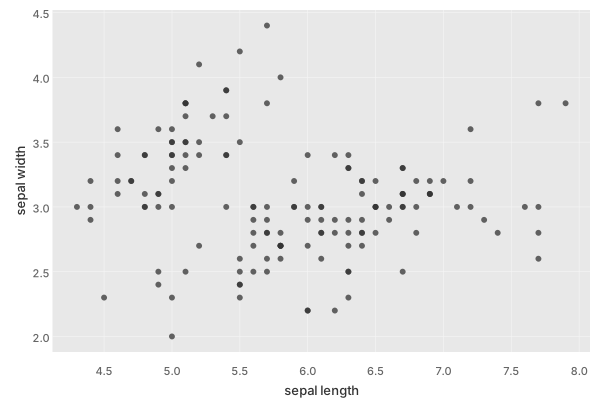
For PNG output, (pj/save pose "x.png") writes a raster image via the Java2D backend; see the Cookbook for other export paths.
What’s Next
- Datasets – what kinds of data Plotje accepts (Tablecloth datasets, maps of vectors, sequences of row maps)
- Poses – the mental model behind composable plotting
- Core Concepts – data formats, marks, stats, color, grouping, coordinates
- Relationships – scatter plots, regression, density, and SPLOM
- Cookbook – recipes for common multi-layer plots
- Configuration – themes, backgrounds, palettes, and other plot-level defaults
- Gallery – many more chart variations with side-by-side code