19 Cookbook
Practical plotting recipes – how to combine marks, overlay stats, and build finished charts.
(ns plotje-book.cookbook
  (:require
   ;; Tablecloth -- dataset manipulation
   [tablecloth.api :as tc]
   ;; Kindly -- notebook rendering protocol
   [scicloj.kindly.v4.kind :as kind]
   ;; Plotje -- composable plotting
   [scicloj.plotje.api :as pj]
   ;; Fastmath -- random number generation and summary statistics
   [fastmath.random :as rng]
   [fastmath.stats :as fstats]
   ;; Java-time -- idiomatic date/time construction
   [java-time.api :as jt]
   ;; Rdatasets -- additional datasets beyond the shared ones
   [scicloj.metamorph.ml.rdatasets :as rdatasets]))
Quick Recipes
Boxplot with jittered points
Overlay raw observations on a boxplot summary. The auto-jitter detects the categorical axis and constrains points to the band width.
(-> (rdatasets/datasets-iris)
    (pj/lay-boxplot :species :sepal-length)
(pj/lay-point {:jitter true :alpha 0.3}))Histogram with density overlay
Normalize the histogram to density scale so it is comparable with the KDE (kernel density estimation) curve.
(-> (rdatasets/datasets-iris)
    (pj/lay-histogram :sepal-length {:normalize :density :alpha 0.5})
pj/lay-density)Scatter with regression lines
Fit a linear regression per group to reveal trends across species.
(-> (rdatasets/datasets-iris)
    (pj/pose :sepal-length :sepal-width {:color :species})
    (pj/lay-point {:alpha 0.6})
(pj/lay-smooth {:stat :linear-model}))Violin with jittered points
Show the density shape and every observation together.
(-> (rdatasets/datasets-iris)
    (pj/lay-violin :species :petal-width {:alpha 0.3})
(pj/lay-point {:jitter true :alpha 0.4}))Time series with multiple layers
Combine area, line, and points. Date columns are detected automatically – ticks snap to calendar boundaries.
(def ts-dates (take 52 (jt/iterate jt/plus (jt/local-date 2020 1 6) (jt/weeks 1))))(def ts-ds {:date ts-dates
:value (map #(+ 100.0 (* 30.0 (Math/sin (* (double %) 0.12))))
(range 52))})(-> ts-ds
(pj/lay-area :date :value {:alpha 0.2})
pj/lay-line
(pj/lay-point {:alpha 0.5}))Faceted comparison
Split a scatter plot by species to compare patterns side by side.
(-> (rdatasets/datasets-iris)
    (pj/lay-point :sepal-length :sepal-width {:color :species})
(pj/facet :species))Gantt schedule
A horizontal interval bar per task, with the bar’s left edge at the start date and the right edge at the end date. The Timelines chapter has more variations (color by team, vertical orientation, presidential terms); this is the minimal recipe.
(-> {:task  ["Design" "Build" "Test" "Ship"]
     :start [#inst "2024-01-01" #inst "2024-02-01"
             #inst "2024-03-15" #inst "2024-04-15"]
     :end   [#inst "2024-02-01" #inst "2024-03-20"
             #inst "2024-04-15" #inst "2024-05-01"]}
    (pj/lay-interval-h :start :task {:x-end :end})
(pj/options {:title "Project schedule"}))Ridgeline with color
Compare distribution shapes across categories with overlapping density curves. Grid lines at each baseline aid comparison.
(-> (rdatasets/datasets-iris)
(pj/lay-ridgeline :species :sepal-length {:color :species}))Stacked bars (proportions)
Show the proportion of each species per island using 100% stacked bars.
(-> (rdatasets/palmerpenguins-penguins)
(pj/lay-bar :island {:position :fill :color :species}))Multi-Layer Compositions
Overall regression with per-group points
Color points by group, but fit a single overall regression line.
(-> (rdatasets/datasets-iris)
    (pj/lay-point :sepal-length :sepal-width {:color :species})
(pj/lay-smooth {:stat :linear-model :color nil}))Different data per layer
Each lay-* accepts {:data ...} to override the pose-level dataset. This lets you overlay marks from two different tables – ggplot2’s geom_line(data=df2) + geom_point(data=df1) pattern.
(-> (rdatasets/datasets-iris)
    (pj/lay-point :sepal-length :sepal-width {:alpha 0.3})
    (pj/lay-point {:data {:sepal-length [5.0 6.5]
                          :sepal-width [3.5 3.0]}
                   :x :sepal-length :y :sepal-width
:color "red" :size 6}))An annotation arrow
A segment written as values rather than read from columns draws one arrow, and a text layer beside it writes the note. On a categorical axis a number is a place counted from one, so 3 is the third category and 3.6 sits most of the way to the fourth. The arrow starts at 3.45, a little short of the note, so its line does not run into the text.
(-> {:violation ["Meter" "Over time" "Parking" "Bus zone"]
     :tickets [462 181 92 30]}
    (pj/lay-bar :violation :tickets)
    (pj/coord :flip)
    (pj/lay-segment {:x 3.45 :y 300 :x-end 3 :y-end 100 :arrow :end})
(pj/lay-text {:x 3.6 :y 300 :text "Parking ends a tier"}))Points with error bars
Combining point and errorbar layers shows measurements with uncertainty.
(def experiment
  {:condition ["A" "B" "C" "D"]
   :mean [10.0 15.0 12.0 18.0]
   :ci_lo [8.0 12.0 9.5 15.5]
:ci_hi [12.0 18.0 14.5 20.5]})(-> experiment
(pj/lay-point :condition :mean {:size 5})
(pj/lay-errorbar {:y-min :ci_lo :y-max :ci_hi}))Lollipop with error bars
Composing lollipop stems with error bars.
(-> experiment
    (pj/lay-lollipop :condition :mean)
(pj/lay-errorbar {:y-min :ci_lo :y-max :ci_hi}))Summary (mean +/- SE) with raw data
The summary layer type computes mean and SE (standard error) per category.
(-> (rdatasets/datasets-iris)
    (pj/lay-point :species :sepal-length {:alpha 0.3 :jitter 5})
(pj/lay-summary {:color :species}))Tipping behavior
Scatter + per-group regression to compare smoker tipping patterns.
(-> (rdatasets/reshape2-tips)
    (pj/pose :total-bill :tip {:color :smoker})
    pj/lay-point
    (pj/lay-smooth {:stat :linear-model})
    (pj/options {:title "Tipping Behavior"
                 :x-label "Total Bill ($)"
:y-label "Tip ($)"}))More Recipes
Confidence band
A scatter plot with per-group linear regressions and 95% confidence bands.
(-> (rdatasets/datasets-iris)
    (pj/pose :sepal-length :sepal-width {:color :species})
    (pj/lay-point {:alpha 0.5})
    (pj/lay-smooth {:stat :linear-model :confidence-band true})
(pj/options {:title "Sepal Regression with Confidence Bands"}))Stacked vs grouped bars
Side-by-side comparison: default dodged bars vs stacked bars.
(-> (rdatasets/reshape2-tips)
    (pj/lay-bar :day {:color :sex})
(pj/options {:title "Dodged Bars (default)"}))(-> (rdatasets/reshape2-tips)
(pj/lay-bar :day {:position :stack :color :sex})
(pj/options {:title "Stacked Bars"}))Step line
A step plot for discrete time series data – useful when values hold constant between observations.
(def daily-temps
  {:day (range 1 15)
:temp [12 14 14 16 18 17 15 13 14 16 19 21 20 18]})(-> daily-temps
(pj/lay-step :day :temp {:color "#2196F3"})
(pj/lay-point {:color "#2196F3" :size 3})
(pj/options {:title "Daily Temperature (Step)"}))Contour + scatter
Density contour lines overlaid on a scatter plot – reveals high-density regions in a point cloud.
(-> (rdatasets/datasets-iris)
    (pj/lay-point :sepal-length :sepal-width {:color :species :alpha 0.4})
(pj/lay-contour {:levels 5}))Label marks
Annotate specific data points with text labels. The labelled rows are a dataset of their own, given to the label layer as its :data, so the whole cloud is drawn once in grey and three rows of it are named. Here each label names the longest-sepalled flower of its species. :align-x :right with a negative :offset-x puts the box to the left of its point, which keeps the labels on the right-hand edge of the data inside the panel.
(def longest-per-species
  (-> (rdatasets/datasets-iris)
      (tc/group-by :species)
      (tc/order-by :sepal-length :desc)
      (tc/head 1)
tc/ungroup))longest-per-species_unnamed [3 6]:
| :rownames | :sepal-length | :sepal-width | :petal-length | :petal-width | :species |
|---|---|---|---|---|---|
| 15 | 5.8 | 4.0 | 1.2 | 0.2 | setosa |
| 51 | 7.0 | 3.2 | 4.7 | 1.4 | versicolor |
| 132 | 7.9 | 3.8 | 6.4 | 2.0 | virginica |
(-> (rdatasets/datasets-iris)
    (pj/lay-point :sepal-length :sepal-width {:size 3 :color "#bbbbbb"})
    (pj/lay-point {:data longest-per-species
                   :x :sepal-length :y :sepal-width
                   :size 5 :color "#cc3311"})
    (pj/lay-label {:data longest-per-species
                   :x :sepal-length :y :sepal-width :text :species
:align-x :right :offset-x -8}))Value labels inside bars
To print a value on each bar, overlay a lay-text layer added after the bar so it paints on top. Use :align-x :right so the label’s right edge sits at the bar’s end, so the text extends leftward inside the bar rather than past its end.
(def species-share
  {:species ["setosa" "versicolor" "virginica"]
:percent [33.3 33.3 33.3]})(-> species-share
(pj/lay-bar :species :percent {:color "#a6cee3"})
(pj/lay-text :species :percent {:text :percent :align-x :right})
(pj/coord :flip))Labelling counted bars with their counts
pj/lay-bar with only a category column counts the rows in each category, and there is no column holding those counts to point a label at. {:stat :count} on the label layer reads the same counted values the bars are drawn from, so each bar is labelled with its own height and the two cannot disagree.
(-> (rdatasets/datasets-iris)
    (pj/lay-bar :species)
(pj/lay-label {:stat :count :align-x :center}))Labels on grouped bars
Bars grouped by color are dodged side by side within each category. A label layer grouped by that same column is dodged along with them, so each label sits over the bar it names rather than at the middle of the category. Group the labels with :group, which is the label layer’s way of naming the column the bars use for :color.
(-> {:sex ["male" "male" "female" "female"]
     :species ["cat" "dog" "cat" "dog"]
     :percent [21 17 9 14]}
    (pj/pose :sex :percent)
    (pj/lay-bar {:color :species})
(pj/lay-label {:text :percent :group :species :align-x :center}))Custom palette map
Assign specific colors to each category using a palette map.
(-> (rdatasets/datasets-iris)
    (pj/lay-point :sepal-length :sepal-width {:color :species})
    (pj/options {:color-values {:setosa "#E91E63"
                                :versicolor "#4CAF50"
                                :virginica "#2196F3"}
:title "Custom Palette Map"}))Fixed aspect ratio
Use pj/coord :fixed so one unit on x equals one unit on y. This makes the plot square when x and y have equal ranges.
(-> (rdatasets/datasets-iris)
    (pj/pose :sepal-length :sepal-width {:color :species})
    pj/lay-point
    (pj/lay-smooth {:stat :linear-model})
    (pj/coord :fixed)
(pj/options {:title "Fixed Aspect Ratio"}))Diverging color scale
Use a :diverging color range with a :midpoint to center a red-white-blue gradient on a meaningful value (e.g., zero).
(-> {:x (range 20)
     :y (map #(Math/sin (/ % 3.0)) (range 20))
     :change (map #(- % 10) (range 20))}
    (pj/lay-point :x :y {:color :change})
    (pj/options {:color-range :diverging
                 :color-midpoint 0
:title "Diverging Color Scale"}))LOESS (local regression) confidence ribbon
Add {:confidence-band true} to a LOESS smoother for a bootstrap confidence band.
(-> (rdatasets/datasets-iris)
    (pj/pose :sepal-length :sepal-width {:color :species})
    pj/lay-point
    (pj/lay-smooth {:confidence-band true})
(pj/options {:title "LOESS with 95% CI"}))Multi-plot dashboard
Use pj/arrange to combine independent plots into a grid layout.
(def iris-sepal
  (-> (rdatasets/datasets-iris)
      (pj/lay-point :sepal-length :sepal-width {:color :species})
(pj/options {:title "Sepal" :width 300 :height 250})))(def iris-petal
(-> (rdatasets/datasets-iris)
(pj/lay-point :petal-length :petal-width {:color :species})
(pj/options {:title "Petal" :width 300 :height 250})))(pj/arrange [iris-sepal iris-petal]
{:title "Iris Dashboard" :cols 2})Labeled scatter
Combine points with text labels, using :offset-y to lift the text clear of its point. The amount is a distance on the page, so the same number works whatever the axes measure – a :dy would be a number of millions of people here, and would have to be guessed again on the next chart.
(def top-cities
  {:city ["Tokyo" "Delhi" "Shanghai" "São Paulo" "Mumbai"]
   :population [37.4 32.9 29.2 22.4 21.7]
:area [2194 1484 6341 1521 603]})(-> top-cities
(pj/lay-point :area :population)
(pj/lay-text {:text :city :align-x :center :offset-y -10})
(pj/options {:title "Population vs Area"}))Annotated Charts
These recipes place text and marks that explain a plot: names on the lines instead of a legend, a note beside the shape it describes, a caption in a corner. The options they use – offsets, values for :x and :y, and :in :drawing-area – are taught in Placing Marks.
Two examples to look at first:
Seeing With Fresh Eyes, Edward Tufte, 2020 – a spread comparing a chart that names its series in a legend with one that names them on the lines
the FT coronavirus trajectory charts, John Burn-Murdoch, Financial Times – direct labels, callouts with leader lines, a dashed reference slope, and a de-emphasised background of series that are shown but not discussed
The recipes below use different data and reproduce neither graphic.
The data is free material from Gapminder, CC-BY, reached here through rdatasets.
Reference lines and bands
The simplest annotations have their own layer types. A rule draws a line across the panel at one value; a band shades the region between two. Both take their positions as values rather than columns, and both take :alpha – a band’s fill opacity, a rule’s line opacity.
(-> (rdatasets/datasets-iris)
    (pj/lay-point :sepal-length :sepal-width {:color :species})
    (pj/lay-rule-h {:y-intercept 3.0})
(pj/lay-band-v {:x-min 5.5 :x-max 6.5 :alpha 0.3}))A reference line on a distribution
A histogram, a density and a rug read one column and count or shape it themselves, so there is no y column to give them. A rule needs no column either – an intercept, :x-intercept on a vertical rule and :y-intercept on a horizontal one, is a written value rather than a column reference – so a rule goes on such a pose like any other layer. Marking where the mean falls is the usual reason.
(-> (rdatasets/datasets-iris)
    (pj/lay-histogram :sepal-length)
    (pj/lay-rule-v {:x-intercept (fstats/mean (:sepal-length (rdatasets/datasets-iris)))
                    :color "firebrick"
:size 2}))The same holds for a band, and for a rule written across the counts rather than across the measurement: pj/lay-rule-h at a count of 20 sits on the axis the histogram computed for itself.
(-> (rdatasets/datasets-iris)
    (pj/lay-histogram :sepal-length)
    (pj/lay-rule-h {:y-intercept 20 :color "firebrick"})
(pj/lay-band-v {:x-min 5.5 :x-max 6.5 :alpha 0.2}))The rule leaves the axis it spans alone. A histogram counts, so its y axis reaches past any line drawn across it; a density is a proportion per unit and stays small, and a y axis stretched to reach the rule would press the curve flat against the bottom. So a density keeps the extent it computed for itself, with the rule drawn across it:
(-> (rdatasets/datasets-iris)
    (pj/lay-density :sepal-length)
    (pj/lay-rug :sepal-length)
    (pj/lay-rule-v {:x-intercept (fstats/mean (:sepal-length (rdatasets/datasets-iris)))
:color "firebrick"}))Labels on the lines instead of a legend
A legend puts the series names in one corner and the series in another. A label at the end of each line puts the name beside the line it names. Five countries, first with a legend:
(def life-tracks
  (-> (rdatasets/gapminder-gapminder)
      (tc/select-rows #(#{"Rwanda" "Cambodia" "China" "Japan" "Botswana"}
                        (:country %)))
(tc/select-columns [:country :year :life-exp])))(-> life-tracks
(pj/lay-line :year :life-exp {:color :country})
(pj/options {:title "Life expectancy at birth"
:width 620 :height 380}))Now with the names on the lines. The label layer draws from the last year alone – one row per country – and takes its color from the same :country column, so each name matches its line. :offset-x moves the text clear of the line’s end by a few drawing units. A :dx would not serve here: the gap is a distance on the page, not a number of years.
(-> life-tracks
    (pj/lay-line :year :life-exp {:color :country})
    (pj/lay-text {:data (tc/select-rows life-tracks #(= 2007 (:year %)))
                  :x :year :y :life-exp :text :country :color :country
                  :offset-x 8})
    (pj/options {:title "Life expectancy at birth"
                 :width 620 :height 380
:legend-position :none}))The axis grew to the right to hold the labels. A numeric domain is widened to fit its text marks, and the offset counts toward the width to fit.
Callout with a leader line
One country, with four layers doing the annotating: a marker on the point being discussed, a dotted leader from the note to the marker, the note itself at a position given as values rather than columns, and a caption placed on the panel with :in :drawing-area.
(-> (rdatasets/gapminder-gapminder)
    (tc/select-rows #(= "Rwanda" (:country %)))
    (pj/lay-line :year :life-exp {:color "#4477aa"})
    (pj/lay-point {:data {:year [1992] :life-exp [23.599]}
                   :x :year :y :life-exp :color "#cc3311" :size 6})
    (pj/lay-line {:data {:year [1972 1990] :life-exp [30 24.5]}
                  :x :year :y :life-exp
                  :color "#777777" :stroke-dash :dotted})
    (pj/lay-text {:x 1971 :y 30 :align-x :right :offset-x -4
                  :color "#333333"
                  :text "life expectancy fell to 23.6 years in 1992"})
    (pj/lay-text {:in :drawing-area :x 10 :y 8 :color "#777777"
                  :text "Rwanda, 1952-2007"})
    (pj/options {:width 640 :height 400
:y-label "life expectancy at birth"}))The two text layers are placed in different spaces on purpose. The callout’s position is a year and a life expectancy, so it tracks the shape it describes when the axis changes. The caption’s position is in drawing units from the corner of the panel background, so it does not move with the data.
A few named series over many pale ones
The two recipes above each showed a handful of series. Every series can be drawn while only some are named, with the rest in one pale color. The Financial Times charts do this with the countries that appear but are not discussed.
All the pale series are one layer. pj/lay-line with a :group and a written :color draws one line per country, every line in that color.
Pick the three to name from the data rather than by hand – the country that ends highest, the one that gained most, and the one with the sharpest single fall:
(def life-history
  (-> (rdatasets/gapminder-gapminder)
(tc/select-columns [:country :year :life-exp])))(def ends-highest
(-> life-history
(tc/select-rows #(= 2007 (:year %)))
(tc/order-by :life-exp :desc)
(tc/rows :as-maps)
first :country))(def gained-most
(-> life-history
(tc/group-by :country)
(tc/aggregate {:gain (fn [ds] (- (reduce max (:life-exp ds))
(reduce min (:life-exp ds))))})
(tc/order-by :gain :desc)
(tc/rows :as-maps)
first :$group-name))The sharpest fall, as a country and as the size of the drop between two consecutive readings:
(def sharpest-fall
  (-> life-history
      (tc/order-by [:country :year])
      (tc/group-by :country)
      (tc/aggregate {:fall (fn [ds]
                             (let [ys (vec (:life-exp ds))]
                               (reduce min 0 (map - (rest ys) ys))))})
      (tc/order-by :fall)
      (tc/rows :as-maps)
      first))
[ends-highest gained-most sharpest-fall]["Japan" "Oman" {:$group-name "Rwanda", :fall -20.421000000000003}]Now the chart. Every country in pale grey, those three in color with their names at the line ends, a callout whose wording is built from the number computed above, and a caption placed on the panel.
(let [named #{ends-highest gained-most (:$group-name sharpest-fall)}
      chosen (tc/select-rows life-history #(named (:country %)))]
  (-> life-history
      (pj/lay-line :year :life-exp {:group :country :color "#d0d0d0"})
      (pj/lay-line {:data chosen :x :year :y :life-exp :color :country})
      (pj/lay-text {:data (tc/select-rows chosen #(= 2007 (:year %)))
                    :x :year :y :life-exp :text :country
                    :color :country :offset-x 8})
      (pj/lay-line {:data {:year [1972 1989] :life-exp [31 25]}
                    :x :year :y :life-exp
                    :color "#777777" :stroke-dash :dotted})
      (pj/lay-text {:x 1971 :y 31 :align-x :right :offset-x -4
                    :color "#333333"
                    :text (format "%s, 1992: a fall of %.0f years in one step"
                                  (:$group-name sharpest-fall)
                                  (- (:fall sharpest-fall)))})
      (pj/lay-text {:in :drawing-area :x 10 :y 8 :color "#888888"
                    :text (format "%d countries, 1952-2007"
                                  (count (distinct (:country life-history))))})
      (pj/options {:width 760 :height 430 :legend-position :none
:y-label "life expectancy at birth"})))Every number in the annotations was computed from the data the chart draws, so refreshing the data updates the wording with it.
Simulated Data
Generate data from a known model and verify the regression recovers it.
(let [r (rng/rng :jdk 77)
      xs (range 0 10 0.5)
      ys (map #(+ (* 3 %)
                  5
                  (* 2 (- (rng/drandom r) 0.5)))
              xs)]
  (-> {:x xs :y ys}
      (pj/lay-point :x :y)
      (pj/lay-smooth {:stat :linear-model})
(pj/options {:title "Simulated: y = 3x + 5 + noise"})))Analytical Walkthroughs
Palmer Penguins
Bill dimensions separate the three species clearly.
(-> (rdatasets/palmerpenguins-penguins)
    (pj/lay-point :bill-length-mm :bill-depth-mm {:color :species})
(pj/options {:title "Palmer Penguins: Bill Dimensions"}))Per-species regression reveals different slopes.
(-> (rdatasets/palmerpenguins-penguins)
    (pj/pose :bill-length-mm :bill-depth-mm {:color :species})
    pj/lay-point
    (pj/lay-smooth {:stat :linear-model})
(pj/options {:title "Bill Length vs Depth with Regression"}))Without grouping, the overall trend appears negative – an example of Simpson’s paradox.
(-> (rdatasets/palmerpenguins-penguins)
    (pj/lay-point :bill-length-mm :bill-depth-mm {:color :species})
    (pj/lay-smooth {:stat :linear-model :color nil})
(pj/options {:title "Simpson's Paradox: Overall vs Per-Group Trend"}))Species distribution across islands.
(-> (rdatasets/palmerpenguins-penguins)
    (pj/lay-bar :island {:color :species})
(pj/options {:title "Species by Island"}))Flipper length vs body mass – a strong positive correlation.
(-> (rdatasets/palmerpenguins-penguins)
    (pj/pose :flipper-length-mm :body-mass-g {:color :species})
    pj/lay-point
    (pj/lay-smooth {:stat :linear-model})
(pj/options {:title "Flipper Length vs Body Mass"}))Body mass distribution by species.
(-> (rdatasets/palmerpenguins-penguins)
    (pj/lay-histogram :body-mass-g {:color :species})
(pj/options {:title "Body Mass Distribution"}))Tips
Tipping behavior: smokers vs non-smokers.
(-> (rdatasets/reshape2-tips)
    (pj/pose :total-bill :tip {:color :smoker})
    pj/lay-point
    (pj/lay-smooth {:stat :linear-model})
    (pj/options {:title "Tipping: Smokers vs Non-Smokers"
:x-label "Total Bill ($)" :y-label "Tip ($)"}))Tip amounts by day, colored by meal time.
(-> (rdatasets/reshape2-tips)
    (pj/lay-bar :day {:color :time})
(pj/options {:title "Visits by Day and Meal Time"}))Stacked view of the same data.
(-> (rdatasets/reshape2-tips)
    (pj/lay-bar :day {:position :stack :color :time})
(pj/options {:title "Visits by Day (Stacked)"}))Horizontal bar chart of party sizes.
(-> (rdatasets/reshape2-tips)
    (pj/lay-bar :day {:color :sex})
    (pj/coord :flip)
(pj/options {:title "Day by Gender (Horizontal)"}))MPG
Engine displacement vs highway fuel efficiency, colored by vehicle class.
(-> (rdatasets/ggplot2-mpg)
    (pj/pose :displ :hwy {:color :class})
    pj/lay-point
    (pj/lay-smooth {:stat :linear-model})
    (pj/options {:title "Displacement vs Highway MPG by Class"}))
Displacement vs city MPG – a similar negative correlation.
(-> (rdatasets/ggplot2-mpg)
    (pj/lay-point :displ :cty {:color :drv})
(pj/options {:title "Engine Displacement vs City Fuel Efficiency"}))Count of cars by drive type.
(-> (rdatasets/ggplot2-mpg)
    (pj/lay-bar :drv)
(pj/options {:title "Cars by Drive Type"}))Large Datasets and Raster Output
By default Plotje renders to SVG, which produces scalable charts that stay sharp at any zoom. But when a plot has tens of thousands of points, the browser must parse and layout a huge SVG DOM. For example, the full diamonds dataset (53,940 rows) produces an 11 MB SVG file.
Setting :format :bufimg renders the plot to a java.awt.image.BufferedImage via membrane’s Java2D backend instead of SVG. For plots with many thousands of points, the raster output is substantially smaller than the equivalent SVG.
SVG (default)
This is the default SVG output for a smaller subset:
(-> (rdatasets/ggplot2-diamonds)
    (tc/head 500)
    (pj/lay-point :carat :price {:color :cut})
(pj/options {:title "Diamonds (500 rows, SVG)"}))BufferedImage output
With :format :bufimg, the full dataset renders as a raster image in the notebook:
(-> (rdatasets/ggplot2-diamonds)
    (pj/lay-point :carat :price {:color :cut :alpha 0.3})
    (pj/options {:title "Diamonds (53,940 rows, BufferedImage)"
                 :format :bufimg}))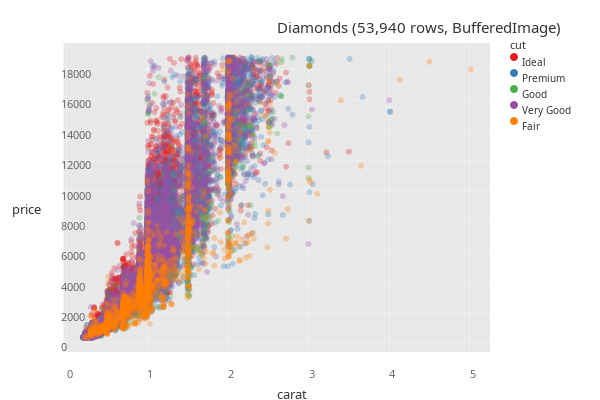
Raster text sits where SVG text sits
Both paths draw the same plan, so choosing raster changes how the marks are stored, not where anything lands. That matters most for text, since a tick label is placed relative to its tick rather than at a coordinate of its own: a y tick label is right-aligned against the axis, an x tick label centers on its tick, and :x-tick-angle turns each one about its own origin.
One pose exercising all three, first as SVG:
(def quarterly-revenue
  (-> {:quarter ["Q1 2024" "Q2 2024" "Q3 2024" "Q4 2024"]
       :revenue [1250000 1480000 1310000 1720000]}
      (pj/lay-bar :quarter :revenue)
      (pj/options {:x-tick-angle -45
                   :y-label "revenue in US dollars"
:thousands-separator ","})))quarterly-revenueand then the same pose through the raster path – same slanted tick labels, same grouped digits right-aligned against the axis, same axis title turned through a quarter turn and printed in full:
(pj/options quarterly-revenue {:format :bufimg})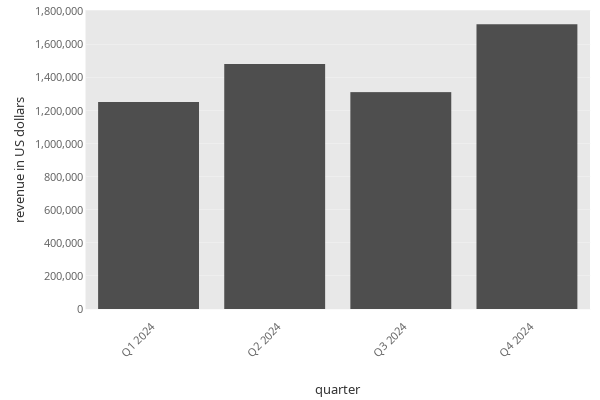
Saving to PNG
Use pj/save with a .png path to write a raster image to disk. The format is inferred from the extension:
(let [path (str (java.io.File/createTempFile "plotje-diamonds" ".png"))]
  (-> (rdatasets/ggplot2-diamonds)
      (pj/lay-point :carat :price {:color :cut})
      (pj/save path))
  ;; Read the first eight bytes and check for PNG magic.
  (with-open [in (java.io.FileInputStream. path)]
    (let [bs (byte-array 8)]
      (.read in bs)
(mapv #(bit-and ^int % 0xFF) (vec bs)))))[137 80 78 71 13 10 26 10]The same call with an explicit {:format :png} makes the format choice unambiguous, useful when the path is built dynamically:
(-> (rdatasets/ggplot2-diamonds)
    (pj/lay-point :carat :price {:color :cut})
    (pj/save out-path {:format :png}))
Two vocabularies: plot return type vs save file format
The two paths above use the same :format keyword for different jobs. pj/plot names a JVM return type:
:svg– hiccup:bufimg– a Java2DBufferedImage
pj/save names the file format:
:svg– SVG file:png– PNG file
A pose’s :opts {:format ...} flows into both contexts. If you pin :format :bufimg on a pose so the notebook renders raster, saving that pose still produces a PNG file – the save path reinterprets the pose-level :bufimg as :png because what is written to disk is a PNG.
See Also
- Core Concepts – the mapping, scope, and identity rules behind these recipes
- Composition – composite poses for multi-panel layouts
What’s Next
- Configuration – control dimensions, palettes, and themes at every scope
- Customization – titles, palettes, themes, and mark styling
- Placing Marks – the placement options the annotation recipes use